A Stanford CoreNLP POS Tagger model for Hmong

A new Stanford CoreNLP POS Tagger model for Hmong is now available.

The model file and corresponding props files are available here: https://github.com/nathanmwhite/hmong-medical-corpus/tree/master/Stanford-CoreNLP

This model is trained and tested on the files created in the previous post, derived from the Hmong Medical Corpus:
The training data file: hmcorpus_train.conllu
The test data file: hmcorpus_test.conllu

Converting text data from SQL tables to CoNLL-U format

The Hmong Medical Corpus stores its tagged text data in a SQL database. To use this data with Stanford CoreNLP, it must first be converted into CoNLL-U format. This post shows how this is done.

First, let’s import the libraries needed.

from itertools import groupby
import os
import sqlite3
import pandas as pd

Next, let’s load the database. The Hmong Medical Corpus database is a SQLite database, so we load it through the sqlite3 module.

conn = sqlite3.Connection('hmcorpus.db')
crsr = conn.cursor()

Now, we use a SQL query to acquire the data we need. We can call the read_sql_query function in Pandas to facilitate creating a Pandas DataFrame.

sql_query = """SELECT doc_ind, sent_ind, token_form, type_form, pos_label, loc FROM tokens
JOIN types ON types.ind=tokens.word_type_ind
JOIN word_loc ON types.word_loc=word_loc.ind
JOIN pos ON pos.ind=types.pos_type;"""
query = pd.read_sql_query(sql_query, conn)
df = pd.DataFrame(query)

Next, we read in a CSV file that maps the part of speech tags from those specific to the Hmong Medical Corpus project to those used in the Universal POS tag set.

conv = pd.read_csv('mapping_to_upos.txt', sep='\t')
print(conv)
   XPOS   UPOS
0    CL   NOUN
1    NN   NOUN
2    PU  PUNCT
3    FW      X
4    VV   VERB
5    PP    ADP
6    QU    NUM
7    LC    ADP
8    AD    ADV
9    DT    DET
10   CC  CCONJ
11   CV   NOUN
12   RL   NOUN
13   CS  SCONJ
14   PN   PRON
15   NR  PROPN
16   CM   PART
17   ON   INTJ
18   JJ    ADJ

We now assign descriptive column names to our DataFrame created above.

df.columns = ['doc_ind', 'sent_ind', 'FORM', 'type_form', 'XPOS', 'word_pos']
df.tail()
doc_ind sent_ind FORM type_form XPOS word_pos
9690 11 14 neeg neeg NN B
9691 11 14 nkag nkag VV B
9692 11 14 teb teb NN B
9693 11 14 chaws chaws NN I
9694 11 14 . . PU O

Now, we add the ID column that will appear in the final CoNLL-U files.

df['ID'] = df.index + 1
df.head(20)
doc_ind sent_ind FORM type_form XPOS word_pos ID
0 1 1 Tus tus CL B 1
1 1 1 Mob mob NN B 2
2 1 1 PU O 3
3 1 1 Shigellosis shigellosis FW B 4
4 1 1 Disease disease FW B 5
5 1 1 Fact fact FW B 6
6 1 1 Sheet sheet FW B 7
7 1 1 Series series FW B 8
8 1 1 Tus tus CL B 9
9 1 1 mob mob NN B 10
10 1 1 shigellosis shigellosis FW B 11
11 1 1 zoo zoo VV B 12
12 1 1 li li PP B 13
13 1 1 cas cas DT I 14
14 1 1 ? ? PU O 15
15 1 2 Shigellosis shigellosis FW B 16
16 1 2 yog yog VV B 17
17 1 2 ib ib QU B 18
18 1 2 tug tug CL I 19
19 1 2 mob mob NN B 20

The next step is the most challenging in this process: converting syllable-based tokens reflecting Hmong orthography to word-based tokens required by the CoNLL-U formatting standards. We begin by finding all syllables labeled with a word_pos value of ‘I’ (for “internal”).

i_hits = df[df['word_pos']=='I']
i_hits.tail()
doc_ind sent_ind FORM type_form XPOS word_pos ID
9661 11 14 ntsws ntsws NN I 9662
9662 11 14 qhuav qhuav VV I 9663
9682 11 14 chaws chaws NN I 9683
9687 11 14 choj choj NN I 9688
9693 11 14 chaws chaws NN I 9694

Here, we create a new DataFrame quads where we are going to combine the non-initial syllables. The DataFrame is named quads because the maximum word length in Hmong is four syllables.

quads = i_hits[['type_form', 'word_pos']]
quads.head()
type_form word_pos
13 cas I
18 tug I
24 mob I
52 sim I
56 ntuj I

Now, we reorganize quads so that each row contains four syllables with their corresponding word position tags. This is done in reverse such that type_form_L1 is the form one syllable to the left, type_form_L2 is two syllables to the left, and so on.

l1 = df.loc[quads.index - 1, ['type_form', 'word_pos']]
l1.index = l1.index + 1
quads = quads.join(l1, rsuffix="_L1")
quads.head()
#l1.head()
l2 = df.loc[quads.index - 2, ['type_form', 'word_pos']]
l2.index = l2.index + 2
quads = quads.join(l2, rsuffix="_L2")
quads.head()
l3 = df.loc[quads.index - 3, ['type_form', 'word_pos']]
l3.index = l3.index + 3
quads = quads.join(l3, rsuffix="_L3")
quads.head(10)
type_form word_pos type_form_L1 word_pos_L1 type_form_L2 word_pos_L2 type_form_L3 word_pos_L3
13 cas I li B zoo B shigellosis B
18 tug I ib B yog B shigellosis B
24 mob I kab B cov B ntawm B
52 sim I tshwm B muaj B ntau B
56 ntuj I caij B lub B rau B
57 sov I ntuj I caij B lub B
61 nplooj I caij B lub B thiab B
62 ntoo I nplooj I caij B lub B
63 zeeg I ntoo I nplooj I caij B
66 nyob I nyob B . O zeeg I

Next, if the syllable content in a row belongs to a different word from that found in column type_form, we erase that content so that the DataFrame only contains content belonging to a single word in a row.

m = quads['word_pos_L1'] != 'I'
quads.loc[m, ['type_form_L2', 'type_form_L3', 'word_pos_L2', 'word_pos_L3']] = ['', '', '', '']
m = quads['word_pos_L2'] != 'I'
quads.loc[m, ['type_form_L3', 'word_pos_L3']] = ['', '']

We then reset the index in order to use the original index from the original dataset as a means to determine which rows represent portions of the same word, to ensure that duplicates are eliminated. We do this by creating an offset column, where the value is shifted one from the original index, which is now its own column.

The rationale for this is straightforward: if the offset value for the row in question is one more than the index value, then the current row is a duplicate that represents only a portion of the full word. In other words, there is another row further down that contains the complete word.

quads = quads.reset_index()
quads['offset'] = quads['index'].shift(periods=-1)
quads.head(20)
index type_form word_pos type_form_L1 word_pos_L1 type_form_L2 word_pos_L2 type_form_L3 word_pos_L3 offset
0 13 cas I li B 18.0
1 18 tug I ib B 24.0
2 24 mob I kab B 52.0
3 52 sim I tshwm B 56.0
4 56 ntuj I caij B 57.0
5 57 sov I ntuj I caij B 61.0
6 61 nplooj I caij B 62.0
7 62 ntoo I nplooj I caij B 63.0
8 63 zeeg I ntoo I nplooj I caij B 66.0
9 66 nyob I nyob B 75.0
10 75 puas I los B 79.0
11 79 pawg I pab B 87.0
12 87 ke I ua B 94.0
13 94 li I thiaj B 115.0
14 115 sis I tab B 123.0
15 123 nyuam I me B 124.0
16 124 yaus I nyuam I me B 145.0
17 145 nyuam I me B 153.0
18 153 nyuam I me B 162.0
19 162 chaws I teb B 177.0

Since some words have more than two syllables, they occupy more than one row in the quads DataFrame, and the following line of code allows only rows with the complete word to appear in quads.

quads = quads[quads['index'] + 1 != quads['offset']]

Next, we create a FORM column in quads that contains the complete word, combining the content of the type_form_XX columns together with underscores. Using underscores for the syllable breaks is the practice used in CoNLL files for Vietnamese, which has the same syllable-based spacing as Hmong, so we adopt the practice here.

quads['FORM'] = quads['type_form_L3'] + '_' + \
                quads['type_form_L2'] + '_' + \
                quads['type_form_L1'] + '_' + \
                quads['type_form']
quads['FORM'] = quads['FORM'].str.lstrip('_')

Below, we can see the results in the FORM column on the right.

quads.head(10)
index type_form word_pos type_form_L1 word_pos_L1 type_form_L2 word_pos_L2 type_form_L3 word_pos_L3 offset FORM
0 13 cas I li B 18.0 li_cas
1 18 tug I ib B 24.0 ib_tug
2 24 mob I kab B 52.0 kab_mob
3 52 sim I tshwm B 56.0 tshwm_sim
5 57 sov I ntuj I caij B 61.0 caij_ntuj_sov
8 63 zeeg I ntoo I nplooj I caij B 66.0 caij_nplooj_ntoo_zeeg
9 66 nyob I nyob B 75.0 nyob_nyob
10 75 puas I los B 79.0 los_puas
11 79 pawg I pab B 87.0 pab_pawg
12 87 ke I ua B 94.0 ua_ke

Next, we assign a head_pos column to quads, which determines the position of the initial syllable in our original DataFrame. Then we set head_pos to be the new index and reduce quads to the two columns we need to merge into our original DataFrame: the index head_pos indicating the position where the combined word needs to appear, and FORM containing the newly combined full word.

quads['head_pos'] = quads['index'] - quads['FORM'].str.count('_')
quads.set_index('head_pos', inplace=True)
quads = quads_final.loc[:, ['FORM']]
quads.head(20)
FORM
0 li_cas
1 ib_tug
2 kab_mob
3 tshwm_sim
5 caij_ntuj_sov
8 caij_nplooj_ntoo_zeeg
9 nyob_nyob
10 los_puas
11 pab_pawg
12 ua_ke
13 thiaj_li
14 tab_sis
16 me_nyuam_yaus
17 me_nyuam
18 me_nyuam
19 teb_chaws
20 sib_deev
21 poj_niam
22 poj_niam
23 txiv_neej

Next, we update the combined words in the original DataFrame containing the full POS-tagged corpus.

df.update(quads)

Next, we need to update all of the POS tags so that a single POS tag that correctly reflects the role of the full word appears in the corpus DataFrame.

First, we need to handle words comprised of quantifier + classifier sequences, where the part of speech of the resulting combination is a classifier. We do this by using a temporary DataFrame where we extract all of the positions where a classifier appears in non-initial position. When this is the case, we select out all instances where the preceding syllable is a quantifier, and assign the tag CL (“classifier”). We then update the corpus DataFrame.

dg = df.loc[df[(df['XPOS']=='CL') & (df['word_pos']=='I')].index - 1, ['XPOS']]
dg = dg[dg['XPOS']=='QU']
dg['XPOS'] = 'CL'
df.update(dg)

Second, we handle words comprised of the associative-reciprocal prefix sib + verb as a verb. We do this by finding each instance where the first three letters of the word is sib. Every word that begins with sib is a verb in our corpus, so we can use a simple assignment.

df.loc[df['FORM'].str[:3]=='sib', 'XPOS'] = 'VV'

Third, the ubiquitous unit li cas “what”, as a unit, is, in Hmong, a demonstrative used in questions.

df.loc[df['FORM']=='li_cas', 'XPOS'] = 'DT'

Now that all of the POS tags in the XPOS column have been updated we can now add the UPOS column with the equivalent values from the Universal POS tagset.

df = df.join(conv.set_index("XPOS"), rsuffix="_match", on=["XPOS"])

We can now drop every row where the type_form is a non-initial syllable, leaving only complete words in the corpus DataFrame.

df = df[df['word_pos'] != 'I']
df.head(20)
doc_ind sent_ind FORM type_form XPOS word_pos ID UPOS
0 1 1 li_cas tus DT B 1 DET
1 1 1 ib_tug mob NN B 2 NOUN
2 1 1 kab_mob PU O 3 PUNCT
3 1 1 tshwm_sim shigellosis FW B 4 X
4 1 1 Disease disease FW B 5 X
5 1 1 caij_ntuj_sov fact FW B 6 X
6 1 1 Sheet sheet FW B 7 X
7 1 1 Series series FW B 8 X
8 1 1 caij_nplooj_ntoo_zeeg tus CL B 9 NOUN
9 1 1 nyob_nyob mob NN B 10 NOUN
10 1 1 los_puas shigellosis FW B 11 X
11 1 1 pab_pawg zoo VV B 12 VERB
12 1 1 ua_ke li PP B 13 ADP
14 1 1 tab_sis ? PU O 15 PUNCT
15 1 2 Shigellosis shigellosis FW B 16 X
16 1 2 me_nyuam_yaus yog VV B 17 VERB
17 1 2 me_nyuam ib CL B 18 NOUN
19 1 2 teb_chaws mob NN B 20 NOUN
20 1 2 sib_deev los VV B 21 VERB
21 1 2 poj_niam ntawm LC B 22 ADP

Since our ultimate goal is to create CoNLL-U files that will enable training of a Stanford CoreNLP POS-tagging model, we can assign the rest of the required rows with underscores.

df['LEMMA'] = '_'
df['FEATS'] = '_'
df['HEAD'] = '_'
df['DEPREL'] = '_'
df['DEPS'] = '_'
df['MISC'] = '_'

Now, we use drop with inplace=True to remove the two columns containing the syllable forms and word position tags that we used for processing from the original database.

df.drop(columns=['type_form', 'word_pos'], inplace=True)
df.head()
doc_ind sent_ind FORM XPOS ID UPOS LEMMA FEATS HEAD DEPREL DEPS MISC
0 1 1 li_cas DT 1 DET _ _ _ _ _ _
1 1 1 ib_tug NN 2 NOUN _ _ _ _ _ _
2 1 1 kab_mob PU 3 PUNCT _ _ _ _ _ _
3 1 1 tshwm_sim FW 4 X _ _ _ _ _ _
4 1 1 Disease FW 5 X _ _ _ _ _ _

Next, we retrieve the set of unique doc_ind and sent_ind combinations as a Numpy array.

sentence_ids = df.groupby(['doc_ind', 'sent_ind']).size().reset_index().loc[:, ['doc_ind', 'sent_ind']].values

Here, we define which sentences from the corpus will appear as part of the testing dataset for training later. We select out sentences 7 and 14 from each of the documents in the corpus. Each document contains at least 14 sentences, so this selection will be suitable.

test_ids = [7, 14]

Finally, we create the CoNLL-U files that will be used for training and testing of our Stanford CoreNLP POS-tagging model.

We iterate through the sentence IDs to create a separate DataFrame for each sentence with its own consecutive index, to match CoNLL formatting requirements. Within each sentence, we no longer need the document and sentence numbers, and so we drop these and reorder the remaining columns to match the CoNLL specification. Then we write to file using to_csv.

f = open('hmcorpus_train.conllu', 'a')
g = open('hmcorpus_test.conllu', 'a')
for id in sentence_ids:
    sent_df = df[(df['doc_ind']==id[0]) & (df['sent_ind']==id[1])].reset_index(drop=True)
    sent_df.loc[:, 'ID'] = sent_df.index + 1
    sent_df.drop(columns=['doc_ind', 'sent_ind'], inplace=True)
    new_columns = ['ID', 'FORM', 'LEMMA', 'UPOS', 'XPOS', 'FEATS', 'HEAD', 'DEPREL', 'DEPS', 'MISC']
    sent_df = sent_df[new_columns]
    if id[1] in test_ids:
        sent_df.to_csv(g, sep='\t', header=False, index=False)
        g.write('\n')
    else:
        sent_df.to_csv(f, sep='\t', header=False, index=False)
        f.write('\n')
f.close()

Conclusion

Altogether, using the methodology above, we can create CoNLL-U files based on our syllable-tokenized SQL database tables to use with Stanford CoreNLP. In the next post, we will train a Stanford CoreNLP POS-tagging model.

Question classification with limited annotated data

For resource-poor languages such as Hmong, large datasets of annotated questions are unavailable, which means that producing an automated question classifier is a potentially challenging task. Currently, a dataset containing 411 annotated Hmong questions is publicly available. The challenge here is to produce a question classifier with adequate accuracy using this available dataset.

What we are exploring here is how well certain models perform with an intentionally limited set of data. This will allow us to gain a better understanding about what kinds of model architectures would work best in the long-term for resource-poor languages, which in most cases will never have the kind of robust data that produce SOTA results in more prominent languages.

We will test five different models with our dataset and compare their accuracy:

  1. Three-layer MLP using word embeddings
  2. Double BiLSTM
  3. Ordered Bidirectional GRU with a Simple RNN
  4. Three-layer MLP using a CountVectorizer
  5. Three-layer MLP using a bigram CountVectorizer and weights regularization

Let’s begin by importing the modules we need to preprocess the data.

import os
import sys
import re

import numpy as np
from gensim.models import KeyedVectors
from keras.preprocessing.text import Tokenizer
from keras.preprocessing.sequence import pad_sequences
from keras.utils.np_utils import to_categorical
from sklearn.model_selection import train_test_split

pos_tag_interface_path = os.path.expanduser(os.path.join('~',
                                                         'python_workspace',
                                                         'medical_corpus_scripting',
                                                         'pos_tagger_interface'))
sys.path.append(pos_tag_interface_path)
from POS_Tagger import HmongPOSTagger

Next, we load the KeyedVectors based on the models that are part of the Hmong Medical Corpus (HMC):

  1. Subword embeddings based on the annotated HMC data (to handle syllable-based spacing in Hmong)
  2. POS tag embeddings based on the annotated HMC data
  3. Token embeddings based on the SCH (soc.culture.hmong) Corpus
subword_embeddings = KeyedVectors.load('subword_model.h5', mmap='r')
tag_embeddings = KeyedVectors.load('tag_alone_model.h5', mmap='r')
token_embeddings = KeyedVectors.load('word2vec_Hmong_SCH.model', mmap='r')

Next, we load the annotated question dataset from the relevant file.

def load_question_data(filename):
    f = open(filename, 'r')
    data = [w.strip().split(' | ') for w in f.readlines() if '???' not in w and '<' not in w]
    f.close()
    print(len(data))
    return data
data = load_question_data('question_type_training_set_2.txt')
411

The dataset contains an uneven distribution of examples: it reflects the kinds of questions for which annotated data are available. This means we need to produce a smaller dataset with an even amount of examples for each category.

Ensuring this, however, means that our dataset of 411 examples will shrink down to 135, given 15 examples for each category.

from collections import Counter

c = Counter(w[1] for w in data)

sorted_data = sorted(list(c.items()), key=lambda item: item[1], reverse=True)
print(sorted_data)

first_filtered_data = [w for w in data if c[w[1]] >= 15]
#filtered_data = [w for w in data if c[w[1]] > 2]

total_count = {w[0]: 0 for w in sorted_data}

filtered_data = []
for item in first_filtered_data:
    if total_count[item[1]] < 15:
        filtered_data.append(item)
        total_count[item[1]] += 1

print(len(filtered_data))

print(total_count.items())
[('Reason', 118), ('Polar', 83), ('Action', 20), ('Description', 18), ('Person', 18), ('Location', 18), ('Time', 15), ('Duration', 15), ('Destination', 15), ('Name', 13), ('Number', 10), ('Event', 10), ('Year', 10), ('Clan', 7), ('Opinion', 6), ('Thing', 5), ('Choice', 4), ('Source', 4), ('Kind', 3), ('Translation', 3), ('Month', 2), ('Meaning', 2), ('Manner', 2), ('Goal', 2), ('Country', 2), ('Spirit', 2), ('Date', 1), ('River', 1), ('Curse', 1), ('Day', 1)]
135
dict_items([('Reason', 15), ('Polar', 15), ('Action', 15), ('Description', 15), ('Person', 15), ('Location', 15), ('Time', 15), ('Duration', 15), ('Destination', 15), ('Name', 0), ('Number', 0), ('Event', 0), ('Year', 0), ('Clan', 0), ('Opinion', 0), ('Thing', 0), ('Choice', 0), ('Source', 0), ('Kind', 0), ('Translation', 0), ('Month', 0), ('Meaning', 0), ('Manner', 0), ('Goal', 0), ('Country', 0), ('Spirit', 0), ('Date', 0), ('River', 0), ('Curse', 0), ('Day', 0)])

For the next step, we split the data into questions and labels using zip.

questions, labels = zip(*filtered_data)

Now, we load the Hmong POS tagger and tag the words that make up the questions. This will produce tags of the sequence subword-POS, as in B-NN for the first syllable of a word, and the unit in question is a noun.

def tag_question_data(questions):
    tagger = HmongPOSTagger()
    tokenized_questions = [re.sub('([\?,;])', ' \g<1>', q).split(' ') for q in questions]
    return tokenized_questions, tagger.tag_words(tokenized_questions)
tokenized_questions, tags = tag_question_data(questions)

Here, we split the subword tags and the POS tags, placing them in separate sentence sets.

def split_subword_pos_tags(tags):
    """This function takes tags of type B-NN (subword-POS)
    and produces separate lists for subword tags and POS tags"""
    subword_tags = []
    pos_tags = []
    for sent in tags:
        subword_sent = []
        pos_sent = []
        for word in sent:
            if word == '-PAD-': # unknown word that needs reassignment
                subword = 'B'
                pos = 'FW'
            else:
                subword, pos = word.split('-')
            subword_sent.append(subword)
            pos_sent.append(pos)
        subword_tags.append(subword_sent)
        pos_tags.append(pos_sent)
    return subword_tags, pos_tags
subword_tags, pos_tags = split_subword_pos_tags(tags)

The next step converts the words, tags, and labels to integers using keras.preprocessing.text.Tokenizer and sets the values for -PAD- and -OUT-.

# notes: keras.preprocessing.text.one_hot, text_to_word_sequence
# special pad values are used because Keras Tokenizer does not permit 0 as a value
tokenizer = Tokenizer()
tokenizer.fit_on_texts(tokenized_questions)
# automatically converts words to sequences of numbers
sequences = tokenizer.texts_to_sequences(tokenized_questions)
word_pad_value = max(tokenizer.word_index.values()) + 1
word_out_value = word_pad_value + 1

pos_tag_tokenizer = Tokenizer()
pos_tag_tokenizer.fit_on_texts(pos_tags)
pos_sequences = pos_tag_tokenizer.texts_to_sequences(pos_tags)
pos_pad_value = max(pos_tag_tokenizer.word_index.values()) + 1
pos_out_value = pos_pad_value + 1

subword_tag_tokenizer = Tokenizer()
subword_tag_tokenizer.fit_on_texts(subword_tags)
subword_sequences = subword_tag_tokenizer.texts_to_sequences(subword_tags)
subword_pad_value = max(subword_tag_tokenizer.word_index.values()) + 1
subword_out_value = subword_pad_value + 1

# can use label_tokenizer.sequences_to_texts once done
label_tokenizer = Tokenizer()
label_tokenizer.fit_on_texts(labels)
label_sequences = [l[0] for l in label_tokenizer.texts_to_sequences(labels)]

Now, we set the maximum length of the sentences, define the variable word_index for use later, and then pad the input sequences.

MAX_LENGTH = max(len(s) for s in sequences)

word_index = tokenizer.word_index

padded_sequences = pad_sequences(sequences,
                                 maxlen=MAX_LENGTH,
                                 padding='post',
                                 value=word_pad_value)
padded_pos_sequences = pad_sequences(pos_sequences,
                                     maxlen=MAX_LENGTH,
                                     padding='post',
                                     value=pos_pad_value)
padded_subword_sequences = pad_sequences(subword_sequences,
                                         maxlen=MAX_LENGTH,
                                         padding='post',
                                         value=subword_pad_value)

Next, before we split the data into training and test sets, we must first convert the input sentences using CountVectorizer. This ensures that the models using the CountVectorizer data use the same sentences as the other models to ensure we can compare them. The first step in doing this is to produce string sentences that contain the original string of the word, the subword position tag, and the POS tag. Here, I combine all three into individual words processed as single units, as intuitively this will treat mobBNN (that is, the noun mob ‘sickness’ at the beginning of a word as B-NN) as a different word from mobBVV (the verb mob ‘be sick’ at the beginning of a word as B-VV).

from sklearn.feature_extraction.text import CountVectorizer

def join_data(tokenized_questions, subword_tags, pos_tags):
    joined_data = []
    for i, q in enumerate(tokenized_questions):
        joined_sent = []
        for j, word in enumerate(q):
            joined_sent.append(''.join([word, subword_tags[i][j], pos_tags[i][j]]))
        joined_data.append(' '.join(joined_sent))
    
    print(joined_data[:2])
    return joined_data

Next, we create a CountVectorizer object for unigrams and create vectors for each sentence.

#CountVectorizer needs sentences made of strings.
joined_data = join_data(tokenized_questions, subword_tags, pos_tags)

vectorizer = CountVectorizer()
vectorizer.fit(joined_data)
vectors = np.array([v.toarray()[0] for v in vectorizer.transform(joined_data)])
['UaBVV casINN kojBPN lamBFW haisBVV liBPP koBFW rauBPP kuvBPN ?OPU', 'LeejBCL nusBFW ,OPU kojBPN pabBVV kuvBPN puasBAD tauBVV ?OPU']

Now, we create a CountVectorizer object for bigrams.

pure_vectorizer_bigrams = CountVectorizer(ngram_range=(2,2))
pure_vectorizer_bigrams.fit(joined_data)
pure_bigram_vectors = np.array([v.toarray()[0] for v in pure_vectorizer_bigrams.transform(joined_data)])

Once all the input preprocessing is complete, we can split the dataset into training and test sets. We have several different kinds of data as input: the word token sequences, vector sequences representing both unigrams and bigrams, the POS tag sequences, and the subword position tag sequences, along with the output question label sequences. Each of these are split into training and test sets, where all of the training sets contain the same sentences in the same order, as do the test sets.

labels_matrix = to_categorical(np.asarray(label_sequences))

TEST_SIZE = 0.2
VALIDATION_SIZE = 0.2

(X_train, 
 X_test, 
 X_vector_train, 
 X_vector_test, 
 X_bigram_vector_train,
 X_bigram_vector_test,
 X_pos_train,
 X_pos_test,
 X_subword_train,
 X_subword_test,
 y_train, 
 y_test) = train_test_split(padded_sequences, 
                                   vectors,
                                   pure_bigram_vectors,
                                   padded_pos_sequences,
                                   padded_subword_sequences,
                                   label_sequences,
                                   test_size=TEST_SIZE)

word_set = set(word_value for sent in X_train for word_value in sent)
pos_set = set(pos_value for sent in X_pos_train for pos_value in sent)
subword_set = set(subword_value for sent in X_subword_train for subword_value in sent)

Once this is complete, we define a function that will create embedding matrices for each input set that requires it for three of the models we will consider below.

def create_embeddings_matrix(input_set, index_dict, word2vec_source_object, convert_caps=False):
    '''Creates an embedding matrix from preexisting Word2Vec model for use in the Keras Embedding layer
    @param input_set: the set object containing all unique X entries in X_train as numeral values
    @param index_dict: the Tokenizer.word_index dict object containing numerical conversions
    @param word2vec_source_object: the KeyedVectors object containing the vector values for embedding'''
    # $PAD and $OUT remain zeros; they are max(index_dict.values()) + 1 and + 2, respectively
    pad_out_tags_length = 2
    embedding_matrix = np.zeros((max(index_dict.values()) + pad_out_tags_length + 1,
                                 word2vec_source_object.vector_size))
    for token, numeral in index_dict.items():
        if numeral in input_set:
            try:
                if convert_caps == True:
                    word2vec_token_value = token.upper()
                else:
                    word2vec_token_value = token
                embedding_vector = word2vec_source_object.wv[word2vec_token_value]
            except KeyError:
                embedding_vector = None
            if embedding_vector is not None:
                embedding_matrix[numeral] = embedding_vector
    return embedding_matrix

Now, we use the new function to create the matrices for the word inputs, the POS tag inputs, and the subword position tag inputs.

words_embedding_matrix = create_embeddings_matrix(word_set,
                                                  tokenizer.word_index,
                                                  token_embeddings)
pos_embedding_matrix = create_embeddings_matrix(pos_set, 
                                                pos_tag_tokenizer.word_index, 
                                                tag_embeddings, 
                                                True)
subword_embedding_matrix = create_embeddings_matrix(subword_set, 
                                                    subword_tag_tokenizer.word_index,
                                                    subword_embeddings, 
                                                    True)

Here, we create another function to produce input matrices from the embedding matrices we just created.

def produce_input_matrix(sequences, embedding_matrix):
    output_sequences = []
    for sent in sequences:
        output_sent = []
        for word in sent:
            output_sent.append(embedding_matrix[word])
        output_sequences.append(output_sent)
    return output_sequences

Now, we produce sequence matrices using the function we just created. These will be the input sets for the first three models we’ll consider.

X_train_sequence_matrix = produce_input_matrix(X_train, 
                                               words_embedding_matrix)
X_test_sequence_matrix = produce_input_matrix(X_test, 
                                              words_embedding_matrix)
X_pos_train_sequence_matrix = produce_input_matrix(X_pos_train, 
                                                   pos_embedding_matrix)
X_pos_test_sequence_matrix = produce_input_matrix(X_pos_test, 
                                                  pos_embedding_matrix)
X_subword_train_sequence_matrix = produce_input_matrix(X_subword_train, 
                                                       subword_embedding_matrix)
X_subword_test_sequence_matrix = produce_input_matrix(X_subword_test, 
                                                      subword_embedding_matrix)

Now, we define how large our output vectors should be by defining y_classes on the basis of the total number of categories found among the question labels in our dataset. Then, we convert our y_train and y_test sets to one-hot vectors.

y_classes = max(label_tokenizer.word_index.values()) + 1
y_train = to_categorical(y_train, num_classes=y_classes)
y_test = to_categorical(y_test, num_classes=y_classes)

Next, we import the necessary libraries from Keras to build the models.

from keras.models import Model
from keras.layers import Input, Embedding, Activation, Flatten, Add
from keras.layers import Dense, LSTM, Bidirectional, GRU, SimpleRNN
from keras.callbacks import EarlyStopping
from keras.regularizers import l2

Next, we create a function that will provide plots of the loss and accuracy results.

from matplotlib import pyplot as plt

%matplotlib inline

def plot_metrics(history_obj):
    plt.plot(history_obj.history['loss'], label='Training loss')
    plt.plot(history_obj.history['val_loss'], label='Validation loss')
    plt.legend(loc="upper left")
    plt.show()
    
    plt.plot(history_obj.history['accuracy'], label='Training accuracy')
    plt.plot(history_obj.history['val_accuracy'], label='Validation accuracy')
    plt.legend(loc="upper left")
    plt.show()

Next, we create a function that can train and test each model.

def run_model(model, countvectorizer=False, bigrams=False, validation=VALIDATION_SIZE):
    if countvectorizer:
        if bigrams:
            model_history = model.fit(np.array(X_bigram_vector_train),
                                      y_train,
                                      batch_size=4, 
                                      epochs=50, 
                                      validation_split=validation)
            plot_metrics(model_history)
            scores = model.evaluate(np.array(X_bigram_vector_test), y_test)
        else:
            model_history = model.fit(np.array(X_vector_train),
                                      y_train,
                                      batch_size=4, 
                                      epochs=50, 
                                      validation_split=validation)
            plot_metrics(model_history)
            scores = model.evaluate(np.array(X_vector_test), y_test)
    else:
        model_history = model.fit([X_train_sequence_matrix, 
                                   X_pos_train_sequence_matrix,
                                   X_subword_train_sequence_matrix], 
                                  y_train,
                                  batch_size=4, 
                                  epochs=50, 
                                  validation_split=validation)
        plot_metrics(model_history)
        scores = model.evaluate([X_test_sequence_matrix, 
                                 X_pos_test_sequence_matrix,
                                 X_subword_test_sequence_matrix], 
                                y_test)
    print("Training set accuracy: {result:.2f} percent".format(result= \
                                                               model_history.history['accuracy'][-1]*100))
    if validation > 0.0:
        print("Validation set accuracy: {result:.2f} percent".format(result= \
                                                                 model_history.history['val_accuracy'][-1]*100))
    print("Accuracy: {result:.2f} percent".format(result=(scores[1]*100)))

At this point, we are ready to build and test the models. Our first model is a multilayer perceptron (MLP). This network will have three Dense layers: two hidden layers using a rectified linear unit (ReLU) activation and one output layer using a softmax activation. We also use a Flatten layer between the second hidden layer and the output layer, as our input is sentences made up of words and our output is a single label. That is, each question as input is two-dimensional, while each label as output is one-dimensional, meaning that we need to reduce the dimensionality—exactly what Flatten does.

# Ordered MLP
word_input = Input(shape=(MAX_LENGTH, 150))
pos_input = Input(shape=(MAX_LENGTH, 150))
subword_input = Input(shape=(MAX_LENGTH, 150))
addition_layer = Add()([word_input, pos_input, subword_input])
dense_1 = Dense(256, activation='relu')(addition_layer)
dense_2 = Dense(256, activation='relu')(dense_1)
flatten_layer = Flatten()(dense_2)
dense_3 = Dense(y_classes, activation='softmax')(flatten_layer)

model = Model(inputs=[word_input, pos_input, subword_input], outputs=dense_3)
model.compile(optimizer='adam', 
              loss='categorical_crossentropy', 
              metrics=['accuracy'])

print(model.summary())
Model: "model_7"
__________________________________________________________________________________________________
Layer (type)                    Output Shape         Param #     Connected to                     
==================================================================================================
input_13 (InputLayer)           (None, 34, 150)      0                                            
__________________________________________________________________________________________________
input_14 (InputLayer)           (None, 34, 150)      0                                            
__________________________________________________________________________________________________
input_15 (InputLayer)           (None, 34, 150)      0                                            
__________________________________________________________________________________________________
add_4 (Add)                     (None, 34, 150)      0           input_13[0][0]                   
                                                                 input_14[0][0]                   
                                                                 input_15[0][0]                   
__________________________________________________________________________________________________
dense_15 (Dense)                (None, 34, 256)      38656       add_4[0][0]                      
__________________________________________________________________________________________________
dense_16 (Dense)                (None, 34, 256)      65792       dense_15[0][0]                   
__________________________________________________________________________________________________
flatten_2 (Flatten)             (None, 8704)         0           dense_16[0][0]                   
__________________________________________________________________________________________________
dense_17 (Dense)                (None, 10)           87050       flatten_2[0][0]                  
==================================================================================================
Total params: 191,498
Trainable params: 191,498
Non-trainable params: 0
__________________________________________________________________________________________________
None

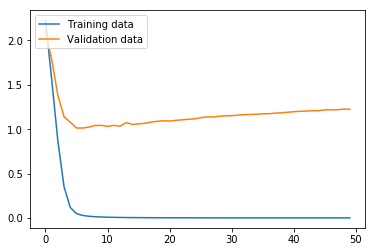
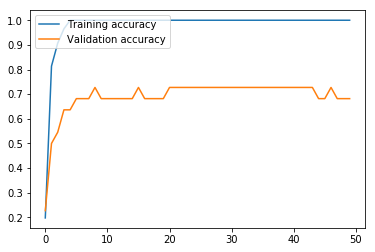
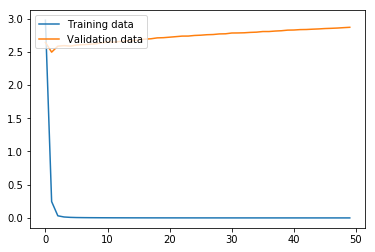
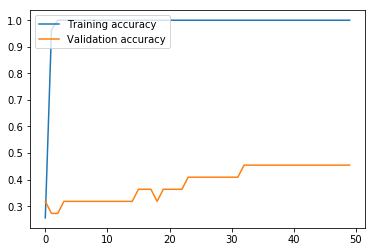
Now we run the MLP model using the function we defined above. As we can see from the graphs, the model effectively converged after only two iterations in regard to the loss, but, interestingly, the validation accuracy continued to increase even as the validation loss slowly increased. In any case, this MLP model produced an accuracy of only 18.52% on the test data, where the variance produced by the limited number of training data proved too problematic for the MLP with the hyperparameters chosen.

run_model(model)
Train on 86 samples, validate on 22 samples
Epoch 1/50
86/86 [==============================] - 1s 15ms/step - loss: 2.9749 - accuracy: 0.2558 - val_loss: 2.6418 - val_accuracy: 0.3182
...
Epoch 50/50
86/86 [==============================] - 1s 7ms/step - loss: 1.5699e-04 - accuracy: 1.0000 - val_loss: 2.8688 - val_accuracy: 0.4545
27/27 [==============================] - 0s 824us/step
Training set accuracy: 100.00 percent
Validation set accuracy: 45.45 percent
Accuracy: 18.52 percent

Our second model is a BiLSTM model, which contains two Bidirectional LSTM (Long Short-Term Memory) hidden layers and a Dense layer with a softmax activation as output.

word_bilstm2_input = Input(shape=(MAX_LENGTH, 150))
pos_bilstm2_input = Input(shape=(MAX_LENGTH, 150))
subword_bilstm2_input = Input(shape=(MAX_LENGTH, 150))
addition_bilstm2_layer = Add()([word_bilstm2_input, pos_bilstm2_input, subword_bilstm2_input])
bilstm2_layer = Bidirectional(LSTM(256, return_sequences=True))(addition_bilstm2_layer)
bilstm2_layer_2 = Bidirectional(LSTM(256))(bilstm2_layer)
final_bilstm2_layer = Dense(y_classes, activation='softmax')(bilstm2_layer_2)

model_bilstm2 = Model(inputs=[word_bilstm2_input, 
                              pos_bilstm2_input, 
                              subword_bilstm2_input], 
                      outputs=final_bilstm2_layer)
model_bilstm2.compile(loss='categorical_crossentropy', 
                      optimizer='adam', 
                      metrics=['accuracy'])

print(model_bilstm2.summary())
Model: "model_8"
__________________________________________________________________________________________________
Layer (type)                    Output Shape         Param #     Connected to                     
==================================================================================================
input_16 (InputLayer)           (None, 34, 150)      0                                            
__________________________________________________________________________________________________
input_17 (InputLayer)           (None, 34, 150)      0                                            
__________________________________________________________________________________________________
input_18 (InputLayer)           (None, 34, 150)      0                                            
__________________________________________________________________________________________________
add_5 (Add)                     (None, 34, 150)      0           input_16[0][0]                   
                                                                 input_17[0][0]                   
                                                                 input_18[0][0]                   
__________________________________________________________________________________________________
bidirectional_4 (Bidirectional) (None, 34, 512)      833536      add_5[0][0]                      
__________________________________________________________________________________________________
bidirectional_5 (Bidirectional) (None, 512)          1574912     bidirectional_4[0][0]            
__________________________________________________________________________________________________
dense_18 (Dense)                (None, 10)           5130        bidirectional_5[0][0]            
==================================================================================================
Total params: 2,413,578
Trainable params: 2,413,578
Non-trainable params: 0
__________________________________________________________________________________________________
None

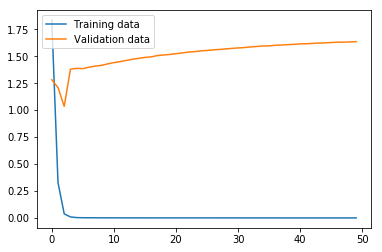
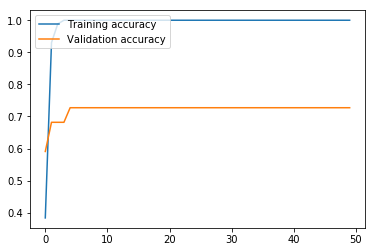
Here, we run the BiLSTM. The results are markedly higher than with our MLP, which is unsurprising, given that the BiLSTM architecture is more appropriate than MLP for ordered sentence data. While our validation loss got progressively worse after only three iterations, the validation accuracy continued to improve until the fifth iteration, and leveled off. The validation accuracy at 72.73% means that this model still struggles with high variance, but the accuracy on the test set at 88.89% means that this model looks promising if the variance is adequately addressed.

run_model(model_bilstm2)
Train on 86 samples, validate on 22 samples
Epoch 1/50
86/86 [==============================] - 25s 291ms/step - loss: 1.8337 - accuracy: 0.3837 - val_loss: 1.2817 - val_accuracy: 0.5909
...
Epoch 50/50
86/86 [==============================] - 24s 278ms/step - loss: 6.3236e-05 - accuracy: 1.0000 - val_loss: 1.6352 - val_accuracy: 0.7273
27/27 [==============================] - 1s 30ms/step
Training set accuracy: 100.00 percent
Validation set accuracy: 72.73 percent
Accuracy: 88.89 percent

Our third model is a Bidirectional GRU (gated recurrent unit) with a simple RNN (recursive neural network) layer and Dense layer with a softmax activation as output.

# Bidirectional GRU with simple RNN
word_bigru_input = Input(shape=(MAX_LENGTH, 150))
pos_bigru_input = Input(shape=(MAX_LENGTH, 150))
subword_bigru_input = Input(shape=(MAX_LENGTH, 150))
addition_bigru_layer = Add()([word_bigru_input, pos_bigru_input, subword_bigru_input])
bigru_layer = Bidirectional(GRU(256, return_sequences=True))(addition_bigru_layer)
rnn_bigru_layer = SimpleRNN(256, activation='relu')(bigru_layer)
dense_bigru_layer = Dense(y_classes, activation='softmax')(rnn_bigru_layer)

model_bigru = Model(inputs=[word_bigru_input, pos_bigru_input, subword_bigru_input], outputs=dense_bigru_layer)
model_bigru.compile(loss='categorical_crossentropy', optimizer='adam', metrics=['accuracy'])

print(model_bigru.summary())
Model: "model_9"
__________________________________________________________________________________________________
Layer (type)                    Output Shape         Param #     Connected to                     
==================================================================================================
input_19 (InputLayer)           (None, 34, 150)      0                                            
__________________________________________________________________________________________________
input_20 (InputLayer)           (None, 34, 150)      0                                            
__________________________________________________________________________________________________
input_21 (InputLayer)           (None, 34, 150)      0                                            
__________________________________________________________________________________________________
add_6 (Add)                     (None, 34, 150)      0           input_19[0][0]                   
                                                                 input_20[0][0]                   
                                                                 input_21[0][0]                   
__________________________________________________________________________________________________
bidirectional_6 (Bidirectional) (None, 34, 512)      625152      add_6[0][0]                      
__________________________________________________________________________________________________
simple_rnn_2 (SimpleRNN)        (None, 256)          196864      bidirectional_6[0][0]            
__________________________________________________________________________________________________
dense_19 (Dense)                (None, 10)           2570        simple_rnn_2[0][0]               
==================================================================================================
Total params: 824,586
Trainable params: 824,586
Non-trainable params: 0
__________________________________________________________________________________________________
None

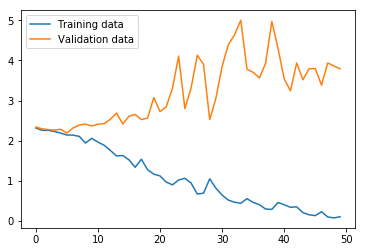
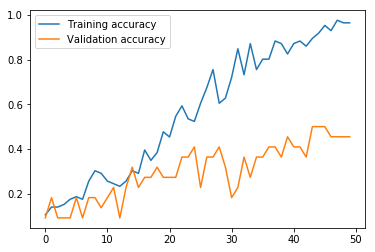
Now we run the BiGRU. The results suggest that the training loss has not yet converged, which, taken with the training accuracy at 96.51%, would mean the model should be run for more iterations. However, the validation loss and accuracy suggest that the training set and validation sets give quite divergent results. Furthermore, the test set accuracy at 37.04% means the variance adversely affects this model architecture as severely as with the MLP.

run_model(model_bigru)
Train on 86 samples, validate on 22 samples
Epoch 1/50
86/86 [==============================] - 16s 190ms/step - loss: 2.3191 - accuracy: 0.1047 - val_loss: 2.3406 - val_accuracy: 0.0909
...
Epoch 50/50
86/86 [==============================] - 14s 164ms/step - loss: 0.1099 - accuracy: 0.9651 - val_loss: 3.7930 - val_accuracy: 0.4545
27/27 [==============================] - 0s 10ms/step
Training set accuracy: 96.51 percent
Validation set accuracy: 45.45 percent
Accuracy: 37.04 percent

Next, we try CountVectorizer data with a three-layer MLP.

# CountVectorizer with MLP
bag_word_input = Input(shape=(len(vectors[0]),))
bag_dense_1 = Dense(256, activation='relu')(bag_word_input)
bag_dense_2 = Dense(256, activation='relu')(bag_dense_1)
bag_dense_3 = Dense(y_classes, activation='softmax')(bag_dense_2)
model_cv = Model(inputs=bag_word_input, outputs=bag_dense_3)
model_cv.compile(optimizer='adam', loss='categorical_crossentropy', metrics=['accuracy'])

print(model_cv.summary())
Model: "model_1"
_________________________________________________________________
Layer (type)                 Output Shape              Param #   
=================================================================
input_2 (InputLayer)         (None, 340)               0         
_________________________________________________________________
dense_3 (Dense)              (None, 256)               87296     
_________________________________________________________________
dense_4 (Dense)              (None, 256)               65792     
_________________________________________________________________
dense_5 (Dense)              (None, 10)                2570      
=================================================================
Total params: 155,658
Trainable params: 155,658
Non-trainable params: 0
_________________________________________________________________
None

Next, we run the model. This MLP model using CountVectorizer data performs much better than the MLP using word embeddings above. The validation set loss effectively reaches bottom at the seventh iteration, and reaches its maximum accuracy of 72.73% at around iteration 21, meaning that 50 iterations is unnecessary, and in fact slightly hurts the results. Nevertheless, like the other models, this model struggles with variance produced by the small data size, given a final test accuracy of 74.07% versus a training set accuracy of 100.00%.

run_model(model_cv, countvectorizer=True)
Train on 86 samples, validate on 22 samples
Epoch 1/50
86/86 [==============================] - 1s 14ms/step - loss: 2.2271 - accuracy: 0.1977 - val_loss: 2.1032 - val_accuracy: 0.2273
...
Epoch 50/50
86/86 [==============================] - 0s 4ms/step - loss: 2.7790e-04 - accuracy: 1.0000 - val_loss: 1.2247 - val_accuracy: 0.6818
27/27 [==============================] - 0s 565us/step
Training set accuracy: 100.00 percent
Validation set accuracy: 68.18 percent
Accuracy: 74.07 percent

Our fifth and final model is a MLP using Bigram CountVectorizer data as input and L2 regularization to prevent early convergence.

# Bigram CountVectorizer with MLP and regularization
bireg_word_input = Input(shape=(len(pure_bigram_vectors[0]),))
bireg_dense_1 = Dense(256, activation='relu', kernel_regularizer=l2(l=0.003))(bireg_word_input)
bireg_dense_2 = Dense(256, activation='relu', kernel_regularizer=l2(l=0.003))(bireg_dense_1)
bireg_dense_3 = Dense(y_classes, activation='softmax')(bireg_dense_2)
model_bireg = Model(inputs=bireg_word_input, outputs=bireg_dense_3)
model_bireg.compile(optimizer='adam', loss='categorical_crossentropy', metrics=['accuracy'])

print(model_bireg.summary())
Model: "model_2"
_________________________________________________________________
Layer (type)                 Output Shape              Param #   
=================================================================
input_3 (InputLayer)         (None, 992)               0         
_________________________________________________________________
dense_6 (Dense)              (None, 256)               254208    
_________________________________________________________________
dense_7 (Dense)              (None, 256)               65792     
_________________________________________________________________
dense_8 (Dense)              (None, 10)                2570      
=================================================================
Total params: 322,570
Trainable params: 322,570
Non-trainable params: 0
_________________________________________________________________
None

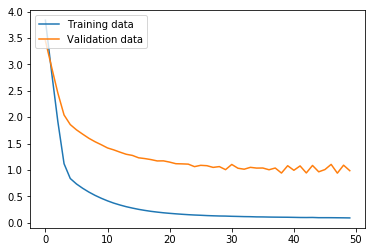
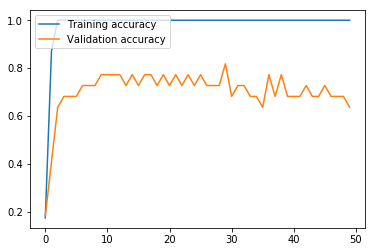
Again here, we run the model. With Bigram CountVectorizer data and L2 regularization, the model still struggles: the validation accuracy oscillates wildly and declines the longer the model is trained. In the end, a validation set accuracy of 63.64% and a test set accuracy of 85.19% means that L2 regularization did not succeed in handling the variance issue in this case. However, the test set accuracy of 85.19% suggests that with other approaches to handle the variance, this model architecture could prove quite fruitful.

run_model(model_bireg, countvectorizer=True, bigrams=True, validation=0.2)
Train on 86 samples, validate on 22 samples
Epoch 1/50
86/86 [==============================] - 1s 17ms/step - loss: 3.8374 - accuracy: 0.1744 - val_loss: 3.4474 - val_accuracy: 0.1818
...
Epoch 50/50
86/86 [==============================] - 1s 7ms/step - loss: 0.0896 - accuracy: 1.0000 - val_loss: 0.9851 - val_accuracy: 0.6364
27/27 [==============================] - 0s 447us/step
Training set accuracy: 100.00 percent
Validation set accuracy: 63.64 percent
Accuracy: 85.19 percent

Conclusion

The results of the five models are shown in the table below.

Model
type
Input data type Training
Accuracy
Validation
Accuracy
Test
Accuracy
MLP Word embedding 100.00% 45.45% 18.52%
BiLSTM Word embedding 100.00% 72.73% 88.89%
BiGRU/
RNN
Word embedding 96.51% 45.45% 37.04%
MLP CountVectorizer
unigram vectors
100.00% 68.18% 74.07%
MLP CountVectorizer
bigram vectors
100.00% 63.64% 85.19%

The results show that BiLSTM is the best architecture for the current problem. The small size of the dataset produced a relatively high degree of variance for all model types, which is naturally expected.

To improve accuracy, that is, to reduce variance in this case, more data combined with the BiLSTM model is the best way to proceed. Given the resource-poor nature of the Hmong language, a set of 30-50 additional examples targeting areas of ambiguity between class types (i.e., question words such as li cas ‘what, why, how’) would be a realistic solution to achieve >90% accuracy.

Using Word Embeddings for Semantic Analysis of Nominal Classifiers

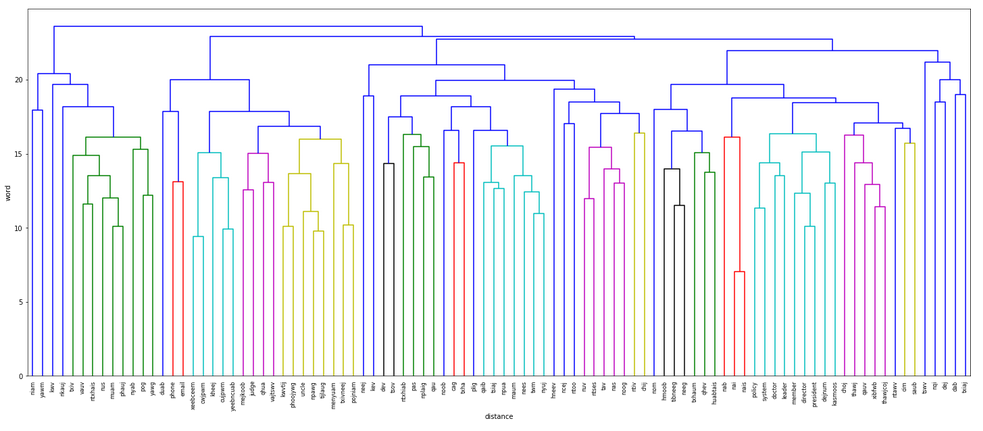
Word embeddings created by Word2Vec can be utilized in exploring the semantic distributions of nouns associated with nominal classifiers. In this post, we explore using dendrogram analysis and k-means clustering with word embeddings as a means to form hypotheses for research involving these distributions.

Nominal classifiers are known to have a range of semantic values that often form a sort of semantic network reflected in the nouns with which they co-occur. This means that the co-occurring nouns will often have various semantic relationships or fall into various semantic groups that would enable us to determine the various categories found in these semantic networks. For those lacking a linguistics background, a nominal classifier is a part of speech not found in European languages, but is ubiquitous in East and Southeast Asian languages, and should not be confused with classifiers in the machine learning sense.

We can perform this exploration by comparing word embeddings of the words that co-occur with a given nominal classifier, either through a dendrogram or k-means clustering.

Here, our goal is to produce a semantic analysis of the Hmong nominal classifier tus.

Ideally, we would use some form of semantic ontology-based system (e.g. WordNet) for word embeddings, but this does not yet exist for a resource-poor language like Hmong, meaning that our best option is the raw text found in the approximately 12-million-token soc.culture.hmong (SCH) corpus.

To enable this sort of analysis, we make the following assumption: given that the word embeddings are trained based on their context in Word2Vec, and this context encodes both syntactic and semantic information, the most similar words will share both syntactic context and semantic values. At the same time, many words will be moderately similar—they may share semantic values but not many syntactic contexts (still desirable for this approach), or many syntactic contexts but not semantic values (the drawback to the approach).

This means that as we pursue the analysis, we must remember that the word embeddings are not purely semantic, but reflect both syntactic and semantic properties of the words, and so some words will appear in certain groups because of its syntactic properties rather than semantics. Nevertheless, because in a significant portion of cases semantics will be a major determining factor for similarity, useful results emerge from this approach that provide a strong basis for hypothesis formation enabling further research, so long as the results are considered judiciously.

Let’s begin.

Import libraries.

The first step is to import the relevant modules and classes. The NLTK library is used to manipulate the data from the corpus that we’re going to use, and Word2Vec is used to convert the corpus vocabulary into vectors that can be manipulated for the analysis.

Load training corpus.

The next step is to navigate to the folder containing the raw corpus, and importing it using the PlaintextCorpusReader class from the nltk.corpus module.
The corpus we’re using is the SCH Corpus, a publicly-available corpus of Hmong text that derives from forum posts online on soc.culture.hmong Usenet.

os.chdir(os.path.expanduser(os.path.join('~','sch_corpus')))

hmong = PlaintextCorpusReader('.', '.*').sents()

Train word embeddings with Word2Vec.

Next, we use the Word2Vec class from gensim.models to create our word vectors. The argument window is set to 10 to indicate that a window of 10 around the chosen word should be used to train the vectors. size is the size of the vector for each word, set here to 150 to enable a reasonably robust yet compact set of vectors. iter is the number of iterations used in training; here, I’ve set it to 50.

model = Word2Vec(sentences=hmong, window=10, size=150, iter=50, workers=10)

Carry out data preprocessing to produce a high-quality set of nouns.

This step uses BigramCollocationFinder from nltk.collocations to find all the bigram collocations in the corpus. We do this because we want to have nouns that collocate with the Hmong classifier tus. We save a deep copy of the bigrams for later use using copy.copy.

bigrams = finder.from_words([w for sent in hmong for w in sent])
bigrams_copy = copy.copy(bigrams)

Next, we apply several filters to limit the bigrams we’re considering to only those that contain tus or its variant form tug, and to ensure the co-occurrence is reasonably common in the corpus, since we want nouns that commonly occur with tus.

bigrams.apply_ngram_filter(lambda x, y: x.lower() not in ['tus', 'tug'])
bigrams.apply_freq_filter(20)

For this step, we draw bigram collocations from the remaining set of bigrams based on a relatively strong degree of co-occurrence, ranked by the chi_sq measure from nltk.collocations.BigramAssocMeasures. We limit the output to the 700 highest ranked bigrams based on this measure, as lower ranked members represent instances where the relationship between tus and the second word is not particularly strong. Then we extract out only the second members from each collocation-chi_sq score pair, as the first will be the classifier tus itself.

out = bigrams.score_ngrams(measures.chi_sq)[:700]
out_proc = [w[0][1] for w in out]

Then, we select out the 500 most common bigrams in the entire corpus, extract the nouns from the collocation-frequency pairs, and take the lowercase versions of each one. Then we limit our set of nouns to consider based on their presence both in the 500 most common bigrams list, as well as the list of 700 with the highest chi-squared score. This ensures a balance between the most common nouns with tus in the corpus and those that more strongly correlate with tus in particular.

finds = bigrams.ngram_fd.most_common(500)
finds_proc = [w[0][1] for w in finds]
finds_proc_lower = [w.lower() for w in finds_proc]
total_proc = [w.lower() for w in out_proc if w in finds_proc_lower]

Next we need to clean the list of nouns we’re considering to only include what are obviously nouns, only full words, and only nouns from White Hmong. For languages with better available resources, we would use a POS tagger at an earlier stage of the process, where this would be done automatically; here, a list of non-nouns in our set has been manually provided.

In Hmong, classifiers like tus can be followed by content that are not nouns, such as relative clauses or localizers—that is, a special class of words indicating relative spatial position common in Asian languages; in these cases, the noun is either omitted or is zero.

Also, Hmong has two common orthographies: one that puts spaces between syllables, and another that puts spaces between words. As a result, we need to remove all syllables that are not complete words, selecting only those that are complete words.

Finally, the SCH corpus contains data from both White Hmong and Green Mong. Including data from both would create confusion in our analysis, so we explicitly limit our nouns to those from White Hmong.

non_nouns_to_exclude = ['puav', 'me', 'hluas', 'kws', 'laus', 'twg', 'uas', \
                        'laug', 'ub', 'mos2', '22', 'hlob', 'loj', 'coj', '.', ',', \
                        'ntawd', 'yog', 'tod', 'swb', 'li', 'tuag', '#', 'sau', \
                        'niag', 'tias', 'lawm', 'ib', 'mos', 'muab', '/', 'muaj', \
                        'nrog', 'rau', 'luag', 'ua', 'los', 'nws', 'txawm', 'hais', \
                        'thaum', 'lawv', 'tsi', 'es', 'phem', 'nuav', 'tej', 'has', \
                        'xav', 'hov', 'kuv', 'ces', 'ntawm', 'tawm', 'lwm', '(', 'kiag',\
                        'hu', 'cov', 'ntseeg', 'mus', 'ko', 'mas', 'tiag', 'to', \
                        'yam', 'tag', 'nawb', 'pom', 'miv', 'no', 'peb', 'sib', 'hlub', \
                        'twb', 'thiab', 'pab', 'leej', 'tsis', '...', 'kawg', 'kom', \
                        'xwb', 'tau', 'tshiab', 'noj', 'tus', 'qub', 'lub', 'txoj', \
                        'nyuas', 'thib', 'ntse', 'nyuag', 'thiaj', 'tshab', 'nua', 'koj',\
                        'tham', 'yau', 'tham', 'saib', 'hauv', 'yees', 'teb', 'luj', \
                        'txiav', 'tswj', 'xub', 'thaub', 'cuav', 'puas', 'txheeb', 'puag', \
                        'ruam', 'siab', 'tsim', 'pluag', 'yus', 'tuav', 'rog', 'txawj',\
                        'mob', 'tub']
partial_words_to_exclude = ['poj', 'tij', 'quas', 'xf', 'dr', 'ntsuj', 'tib', 'tuab', \
                            'teeb', 'yeeb', 'xeeb', 'kas', 'cawm', 'zuj', 'npau', 'cuj',\
                            'cwj', 'xov', 'kav', 'kab', 'txheej', 'xib', 'huab', 'pej',\
                            'phooj']
green_mong_to_exclude = ['mivnyuas', 'nam', 'dlaab', 'puj', 'moob', 'tuabneeg', 'quasyawg',\
                         'quaspuj', 'dlev', 'tsaj', 'nav', 'qab']
total_proc = [w for w in total_proc if w not in non_nouns_to_exclude]
total_proc = [w for w in total_proc if w not in partial_words_to_exclude]
total_proc = [w for w in total_proc if w not in green_mong_to_exclude]
total_proc = list(set(total_proc))
The next step provides English glosses for the Hmong words, for readers’ convenience.

total_proc_english = ['stick', 'director', 'animal', 'hook', 'aunt', 'scent', 'price', 'brothers', 'pastor', 'doctor',\
                     'money', 'crossbow', 'grandfather', 'policy', 'judge', 'pig', 'human being', 'God', 'fish',\
                     'phallus', 'spirit', 'flag', 'responsibility', 'grandmother', 'water buffalo', 'behavior',\
                     'boss', 'email', 'person', 'finger', 'friend', 'bird', 'boss', 'soul', 'marriage negotiator',\
                     'creator god', 'daughter-in-law', 'form', 'tree trunk', 'cousin', 'cow', 'brother', 'member',\
                     'uncle', 'bridge', 'wife', 'system', 'leader', 'daughter', 'politician', 'enemy', 'leader', 'leader',\
                     'way', 'characteristic', 'brother', 'mother', 'government official', 'rib', 'chicken', 'grandfather',\
                     'symbol', 'tongue', 'man', 'brother', 'pillar', 'young woman', 'servant', 'horse', 'oneself',\
                     'phone', 'sister', 'Hmong', 'seed', 'snake', 'image', 'dog', 'root', 'river', 'letter', 'mistake',\
                     'rat', 'behavior', 'child', 'boss', 'president', 'tiger', 'female', 'father/husband', 'emperor',\
                     'bone', 'guest', 'son-in-law', 'life']
total_proc_dict = {h: e for h, e in zip(total_proc, total_proc_english)}

Next, we retrieve the vectors from the model for the resulting set of nouns we’ve chosen.

total_proc_vectors = [model.wv[w] for w in total_proc]

Plotting the dendrogram.

To plot a dendrogram, we need to import matplotlib and the dendrogram and linkage classes from scipy.cluster.hierarchy.

from matplotlib import pyplot as plt
from scipy.cluster.hierarchy import dendrogram, linkage

Now, we plot the final dendrogram. The first step is to create a linkage object containing our noun vector list. Then we plot the figure using matplotlib.pyplot and the dendrogram class. We use leaf_font_size to set the font size of the labels in the plot, and leaf_rotation to ensure the labels for each noun are rotated vertically to ensure they are legible. The final item, leaf_label_func, is defined with a lambda function, where a label is mapped to the word in our noun list total_proc that corresponds to the vector in the noun vector list total_proc_vectors.

l = linkage(total_proc_vectors, method='complete', metric='seuclidean')
plt.figure(figsize=(25,10))
plt.ylabel('word')
plt.xlabel('distance')
dendrogram(l, leaf_font_size=8., leaf_rotation=90., leaf_label_func=lambda v: total_proc[v])
plt.show()

The dendrogram groups primarily family and other relational terms on the left in blue and green, including niam ‘mother’, yawm ‘grandmother’, txiv ‘father’, and vauv ‘son-in-law’, with an additional group in mustard yellow, including kwvtij ‘male siblings’ and phoojywg ‘friend(s)’.

A group of fairly abstract terms related to humans appears in cyan toward the left, including cwjpwm ‘behavior’ and kheej ‘oneself’. Terms for human social roles appears in purple toward the left, such as the English borrowing judge and qhua ‘guest’, while an additional grouping dominated by English loans representing professional roles appears in cyan near the right, including doctor and leader, though notably, abstract English-sourced terms are grouped with these. As stated above, this is a result of the nature of the source corpus, which produces word embeddings that reflect a range of relationships, not merely semantic.

Two large groupings of animals also appears, including the cyan group near the center containing primarily domesticated farm animals such as qaib ‘chicken’, npua ‘pig’, and nyuj ‘cow’, and the purple group to the right of center containing small, canonically wild animals such as ntses ‘fish’, nas ‘rat’, and noog ‘bird’.

Modes of communication also receive their own grouping, as with phone, email, and duab ‘picture’ in red and blue toward the left.

Finally, ncej ‘pillar’ and ntoo ‘tree, wood’ are grouped together in blue to the right of center.

One drawback of the dendrogram approach in general, of course, is how groupings are made: more sensible groupings at the macro level may be missed because of the groupings already made at the lower levels. What we see here, however, is that while there are still a number of nouns that appear in unexpected groupings, large, mostly sensible semantic categories still dominate the results: human family terms, human abstract terms, human social roles (especially English-sourced professional ones), domesticated farm animals, small wild animals, methods of communication, and cylindrical wooden things. These categories can serve as a foundational hypothesis for further research, which is exactly our goal here.

K-Means Clustering

Next, we’ll do a k-means clustering analysis of the word embeddings of the nouns.

As with the dendrogram approach above, the k-means clustering approach will still be sensitive to non-semantic features of the word embeddings. Nevertheless, we should still find robust clusters in the results that will serve well in hypothesis formation driving further research.

We begin by importing the necessary libraries. K-means clustering is enabled by sklearn.cluster.KMeans.

from sklearn.cluster import KMeans
import numpy as np
from scipy.spatial.distance import cdist

Next, we train the k-means clustering model. We choose seven clusters here as it produces groupings that are impressionistically the most semantically sensible, as we will see below. Given the use of word embeddings from the SCH corpus, useful approaches to determine the best k value such as the elbow method or silhouette clustering are not particularly helpful for our purposes, as their results rely on the full range of what is encoded in the embeddings rather than semantics alone.

km = KMeans(n_clusters=7, init='random', n_init=30, max_iter=300, tol=1e-04, random_state=0)
y_km = km.fit_predict(total_proc_vectors)

Next, let’s look at the groupings.

outcomes = zip(y_km, total_proc, total_proc_english)
total_proc_grouped = groupby(sorted(outcomes, key=lambda x: x[0]), lambda x: x[0])
for key, group in total_proc_grouped:
    print(key)
    for item in group:
        print(item[1], "'" + item[2] + "'")
    print()
K-means Clustering Results
0
nqi 'price'
txiaj 'money'
tibneeg 'human being'
vajtswv 'God'
dab 'spirit'
dejnum 'responsibility'
neeg 'person'
mejkoob 'marriage negotiator'
choj 'bridge'
pojniam 'wife'
kev 'way'
hmoob 'Hmong'
duab 'image'
dej 'river'
txhaum 'mistake'
menyuam 'child'
neej 'life'

1
xibfwb 'pastor'
doctor 'doctor'
yawg 'grandfather'
chij 'flag'
tswv 'boss'
nai 'boss'
plig 'soul'
saub 'creator god'
nyab 'daughter-in-law'
thawj 'leader'
nom 'government official'
yawm 'grandfather'
qhev 'servant'
nab 'snake'
ntawv 'letter'
nais 'boss'
huabtais 'emperor'

2
niam 'mother'

3
pas 'stick'
nuv 'hook'
hneev 'crossbow'
ntses 'fish'
qau 'phallus'
ntiv 'finger'
ntoo 'tree trunk'
tav 'rib'
nplaig 'tongue'
ncej 'pillar'
noob 'seed'
cag 'root'
nas 'rat'
txha 'bone'

4
director 'director'
policy 'policy'
judge 'judge'
cujpwm 'behavior'
email 'email'
qauv 'form'
member 'member'
system 'system'
thawjcoj 'leader'
kasmoos 'politician'
yeebncuab 'enemy'
leader 'leader'
xeebceem 'characteristic'
cim 'symbol'
txivneej 'man'
kheej 'oneself'
phone 'phone'
cwjpwm 'behavior'
president 'president'

5
phauj 'aunt'
kwvtij 'brothers'
pog 'grandmother'
phoojywg 'friend'
noog 'bird'
npawg 'cousin'
nus 'brother'
uncle 'uncle'
ntxhais 'daughter'
kwv 'brother'
tijlaug 'brother'
nkauj 'young woman'
muam 'sister'
txiv 'father/husband'
qhua 'guest'
vauv 'son-in-law'

6
tsiaj 'animal'
ntxhiab 'scent'
npua 'pig'
twm 'water buffalo'
nyuj 'cow'
qaib 'chicken'
nees 'horse'
dev 'dog'
tsov 'tiger'
maum 'female'

With seven groups, the results are interesting.

While group 0 has an unclear semantic basis—likely reflecting non-semantic information or other idiosyncratic relationships encoded in the word embeddings—group 1 is dominated by terms that refer to people with authority: xibfwb ‘pastor’, nai ‘boss’, nom ‘government official’, and huabtais ’emperor’, for example.

Group 3 likewise has mostly inanimate objects on the one hand—pas ‘stick’, nuv ‘hook’, ntoo ‘tree trunk’— and body parts on the other—nplaig ‘tongue’ and txha ‘bone’, for example.

Group 4 has English borrowings related to official and other professional concepts, including occupations, such as director, judge, system, and policy, some abstract Hmong terms—probably associated with official concepts—such as xeebceem ‘characteristic’ and cwjpwm ‘behavior’.

Group 5 is almost a perfect fit for relationships—phauj ‘aunt’, kwvtij ‘brothers’, phoojywg ‘friend’, and so on—while niam ‘mother’ is alone in group 2 and noog ‘bird’ is inexplicably in group 5.

Group 6 is almost exclusively animal terms—tsiaj ‘animal’, npua ‘pig’, twm ‘water buffalo’—except for ntxhiab ‘scent’, which makes sense as a term associated with animals.

The results from the k-means clustering approach are a sensible starting point for hypothesis formation. Obvious categories include 1) inanimate objects characterized by a straight, rigid shape, 2) similarly “straight” body parts, 3) official concepts, 4) professional roles, 5) professional concepts, 6) relationships, and 7) animals. The following words present special difficulty for this taxonomy of seven categories, and, unsurprisingly, were grouped together as a sort of “other” category as group 0 above: nqi ‘price’, duab ‘image’, dej ‘river’, txhaum ‘mistake’, neej ‘life’, txiaj ‘money’, chij ‘flag’, ntawv ‘letter’, and noob ‘seed’. This can be explained, however, by the fact that the relationship between these items and the larger categories are the likely result of literal and metaphorical, but idiosyncratic, semantic extensions, in addition to the combination of various forms of information reflected in the word embeddings.

Comparison of results

The dendrogram approach produced evidence for the following groupings:

  1. human family terms
  2. human abstract terms
  3. human social roles (especially English-sourced professional ones)
  4. domesticated farm animals
  5. small wild animals
  6. methods of communication
  7. cylindrical wooden things

The k-means clustering approach likewise produced evidence for these groupings:

  1. inanimate objects characterized by a straight, rigid shape
  2. similarly “straight” body parts
  3. official concepts
  4. professional roles
  5. professional concepts
  6. human relationships
  7. animals

Altogether, human terms related to family, society, and professional roles, animal terms, and straight, rigid inanimate objects were uncovered as groupings by both approaches. Furthermore, official/professional concepts, “straight” body parts, and methods of
communication were groupings found in one of the approaches.

The Results as Hypotheses

The above results provide a strong basis for forming hypotheses for the semantic categories associated with the classifier tus. Below, we try new nouns not seen in the analyses above to check our categories. Let’s try xeebntxwv ‘grandchild’ as a human family term, neeb ‘shaman’ as a human society term, dais ‘bear’ for an animal term, and cav ‘log, pole’ for a straight, rigid inanimate object term.

We check for the co-occurrence of these with tus in terms of raw frequency in the bigrams_copy that we created above.

print("tus xeebntxwv 'the grandchild': ", bigrams_copy.ngram_fd[('tus', 'xeebntxwv')])
print("tus neeb 'the shaman': ", bigrams_copy.ngram_fd[('tus', 'neeb')])
print("tus dais 'the bear': ", bigrams_copy.ngram_fd[('tus', 'dais')])
print("tus cav 'the pole': ", bigrams_copy.ngram_fd[('tus', 'cav')])
tus xeebntxwv 'the grandchild':  5
tus neeb 'the shaman':  17
tus dais 'the bear':  8
tus cav 'the pole':  16

These four nouns show frequency of co-occurrences with tus in our corpus of less than 20, meaning that they were eliminated from the analyses above by the line bigrams.apply_freq_filter(20) early on in the process. Nevertheless, all four of these co-occur multiple times with tus, suggesting that our semantic category hypotheses based on the dendrogram and k-means clustering analyses above will likely prove correct, producing useful results contributing to our goal of charting the semantic network associated with tus.

Conclusion

Taken together, the dendrogram analysis and k-means clustering approach above enable hypothesis formation for a semantic network associated with the Hmong classifier tus. This is significant, given the current lack of a semantic ontology for the Hmong language that should otherwise limit this sort of research, and as a result, this approach will likely prove useful in data exploration and hypothesis formation for other resource-poor languages as well.

Using a SQL database for corpus development and management

Corpora are useful tools both for analyzing human language and for NLP application development. However, finding a good platform for building a corpus is not always straightforward. Using the sqlite3 package to create a SQL database to manage our corpus data is an excellent solution, as it provides a means both to maintain the internal structure of the data and to quickly traverse that internal structure.

Let’s begin by importing the necessary libraries.

Import libraries.
import os
import sqlite3
import pickle
Create the database.

For a part-of-speech tagged database, we need to have the following tables:

  1. Documents—to keep track of the original document files
  2. Part of speech—to keep track of all of the possible parts of speech
  3. Word Types—to keep track of all attested word types (or lemmas), rather than the word tokens and their varying forms
  4. Word Tokens—to keep track of the individual word tokens in each document, as they appear in the original

For Hmong in particular, because the language’s orthography places spaces between syllables, we need to keep track of which position in the word each type/token represents. As a result, we need a fifth table:

  1. Word position

Languages with more complicated morphology may need additional tables to keep track of the various morphological categories for a given word. Hmong, however, maximally allows only one affix per word plus reduplication, and morpheme boundaries coincide with syllable boundaries—and thus spaces—and so each morpheme is already stored as a type.

We do, however, want to encode a category only once in the database, and have references made to it, given proper database structure represented by each normal form (https://www.guru99.com/database-normalization.html). So, we refer to categories in one table using indices in another. For example, to reference parts of speech for each word type, we use the index from the parts of speech table to indicate the part of speech for a given type in the word types table.

Below, we use sqlite3.Connection(<database_filename>).cursor().execute with SQL CREATE TABLE commands to create each of the five tables, complete with index references within each table.

os.chdir(os.path.expanduser('~/corpus_location'))

# creates new database
conn = sqlite3.Connection('mycorpus.db')

# get cursor
crsr = conn.cursor()

# string lines to initialize each table in database
create_documents = """CREATE TABLE documents (
index INTEGER NOT NULL PRIMARY KEY AUTOINCREMENT,
document_title VARCHAR(50),
document_addr VARCHAR(150));"""

create_part_of_speech = """CREATE TABLE part_of_speech (
index INTEGER NOT NULL PRIMARY KEY AUTOINCREMENT,
pos_label VARCHAR(2));"""

create_word_location = """CREATE TABLE word_location (
index INTEGER NOT NULL PRIMARY KEY AUTOINCREMENT,
location CHAR);"""

create_word_types = """CREATE TABLE word_types (
index INTEGER NOT NULL PRIMARY KEY AUTOINCREMENT,
word_type_form VARCHAR(20),
word_location INTEGER,
pos_type INTEGER,
FOREIGN KEY (word_location)
REFERENCES word_location(index),
FOREIGN KEY (pos_type)
REFERENCES part_of_speech(index));"""

create_word_tokens = """CREATE TABLE word_tokens (
index INTEGER NOT NULL PRIMARY KEY AUTOINCREMENT,
document_index INTEGER,
sentence_index INTEGER,
word_index INTEGER,
word_type_index INTEGER,
word_token_form VARCHAR(20),
FOREIGN KEY (document_index)
REFERENCES documents(index),
FOREIGN KEY (word_type_index)
REFERENCES word_types(index));"""

crsr.execute(create_documents)
crsr.execute(create_part_of_speech)
crsr.execute(create_word_location)
crsr.execute(create_word_types)
crsr.execute(create_word_tokens)

# set up word_location IOB tags
crsr.execute("INSERT INTO word_location(location) VALUES ('B'), ('I'), ('O');")
Loading the first file to insert.

Next, we use pickle to load a file that we want to insert into the database. pickle is a module that enables a file to loaded after being handled by another Python script elsewhere. Here, I use it to load a file with contents that have been preprocessed for insertion into the database. Note that this preprocessing step will be the subject of a later blog post.

os.chdir(os.path.expanduser('~/database_location/pickling'))
pickle_file_name = '9_txt.pkl'
f = open(pickle_file_name, 'rb')
doc_data = pickle.load(f)
f.close()
Inserting the document information.

The preprocessed data contains the text of the document, but not its name or original location. We insert them here using the SQL command INSERT INTO documents with the name of the file and its original location inserted from a tuple named document. We then run cursor().execute to run the SQL command, and use lastrowid to retrieve the number the database has assigned our newest document, so that we can use it in insertions when we begin inserting tokens from the file into the database.

document = ('Tus Mob Acute Flaccid Myelitis', 'https://www.dhs.wisconsin.gov/publications/p01298h.pdf')
insert_doc = "INSERT INTO docs (document_title, document_addr) VALUES ('" + document[0] + "', '" + document[1] + "');"
document_index = crsr.execute(insert_doc).lastrowid
Create a function to process each word.

Because each document contains hundreds of texts, it is incredibly inefficient to execute a new set of SQL commands for each insertion. As a result, we create a function named insert_word below to run each time we insert a word. The function has four parameters:

  1. word_tuple—contains a tuple with the token string and a combined word position/POS tag
  2. doc_index_value—indicates the ID number for the document in the documents table
  3. sent_index_value—represents the position in sequence of the current sentence in the document
  4. word_index_value—represents the position in sequence of the current word in the current sentence
def insert_word(word_tuple, doc_index_value, sent_index_value, word_index_value):
    '''
    Inserts a word into the database, based on the word_tuple.
    @param word_tuple is 3-tuple containing the token's form, the location within a word, and the part of speech
    @param doc_index_value is the index of the document from which the word is extracted
    @param sent_index_value is the index of the sentence in the document from which the word is extracted
    @param word_index_value is the index of the position of the word within its sentence
    '''
    
    # retrieve pos value if found, otherwise add pos value
    pos_results = crsr.execute("SELECT index FROM part_of_speech WHERE pos_label='" + word_tuple[2] + "';").fetchall()
    if len(pos_results) > 0:
        pos_label_index = pos_results[0][0]
    else:
        pos_label_index = crsr.execute("INSERT INTO part_of_speech (pos_label) VALUES ('" + word_tuple[2] + "');").lastrowid
    
    # retrieve relevant word_loc value
    if word_tuple[1] in ['B', 'I', 'O']:
        word_loc_index = crsr.execute("SELECT index FROM word_location WHERE location='" + word_tuple[1] + "';").fetchone()[0]
    else:
        raise ValueError('Word location value is invalid at word (' + str(sent_index_value - 1) + ', ' \
                        + str(word_index_value - 1) + ').')
    
    # match word[0].lower(), word_loc_index, pos_label_index against word_types, and if a match, retrieve index
    # if not, add and get index
    type_ = word[0].lower()
    type_results = crsr.execute("SELECT index FROM word_types WHERE word_type_form='" + type_ + "' AND word_location=" \
                                + str(word_loc_index) + " AND pos_type=" + str(pos_label_index) + ";").fetchall()
    if len(type_results) > 0:
        type_index = type_results[0][0]
    else:
        type_index = crsr.execute("INSERT INTO word_types (word_type_form, word_location, pos_type) VALUES ('" + type_ + "', " \
                                  + str(word_loc_index) + ", " + str(pos_label_index) + ");").lastrowid
        
    # insert complete values into word_tokens
    insertion = crsr.execute("INSERT INTO word_tokens (document_index, sentence_index, word_index, word_type_index, word_token_form)" \
                            + " VALUES (" + str(doc_index_value) + ", " + str(sent_index_value) + ", " \
                            + str(word_index_value) + ", " + str(type_index) + ", '" + word[0] + "');")
Add each token to the database.

The next step cycles through the tokens in the file opened with pickle above and runs insert_word to insert each token in the database. We then close the database, as once we have run this step, we have finished inserting our first document into the database!

for i, sent in enumerate(doc_data):
    for j, word in enumerate(sent):
        current_word = tuple([word[0]] + word[1].split('-'))
        insert_word(current_word, doc_index, i + 1, j + 1)
conn.commit()
conn.close()
Conclusion

We can create a SQL database using the sqlite3 package to store our data for our corpus. Above, we saw how to create the tables for the corpus using SQL queries and insert our first document. In later posts, we will look at the preprocessing step to convert the original PDF into data ready to insert into the database, and how to use the database to access and search our data.

A semi-supervised combined word tokenizer and POS tagger for Hmong

This post introduces a semi-supervised approach to word tokenization and POS tagging that enables support for resource-poor languages.

The Hmong language is a resource-poor language [1] where corpora of POS-tagged data are previously unavailable, precluding supervised approaches. At the same time, the Hmong language has an unusually high number of homonyms and features syllable-based spacing in its orthography, meaning that widespread ambiguity will create serious problems for unsupervised approaches. A semi-supervised approach is in order.

The approach featured here follows a relatively unusual strategy: combining word tokenization and POS tagging as a single step. Because Hmong has an orthography where spaces are placed between syllables rather than words, word tokenization will be potentially non-trivial. However, a much more prominent language, Vietnamese, has the same issue, yet unlike Hmong, it is a relatively resource-rich language. This means that, with the relevant adaptations to handle a resource-poor language, approaches that work with Vietnamese should prove useful. One of these approaches is in fact combining word tokenization and POS tagging [2][3].

In this approach, word tokenization is combined with POS tagging as a sequence-labeling task where position in the word is handled using IOB tags, where B marks the first syllable of the word, I marks all other syllables of the word, and O marks everything that is not a word. Here, I combine these with POS tags using a hyphen, so that the first syllable of a noun is B-NN and the second syllable of a verb is I-VV.

In my approach here, I use pretrained word embeddings. Though Hmong is a resource-poor language, the Internet has proven popular with Hmong speakers, meaning that speakers have produced thousands of forum posts on the soc.culture.hmong listserv over the past 20 years or so. These have been organized into the approximately 12-million token SCH corpus, which is available for free download here: http://listserv.linguistlist.org/pipermail/my-hm/2015-May/000028.html.

These pretrained word embeddings are created through Word2Vec and loaded as an embedding layer into a Keras-based BiLSTM model. The BiLSTM model is excellent for the word tokenization/POS tagging task as it is specially designed for handling sequences where individual output values are dependent neighboring values.

The model is trained on a set of eight documents—approximately 6000 (actual) words—fully tagged with the combined word position-POS tags mentioned above.

Let’s begin by importing the relevant libraries.

Import libraries.
import os
import sqlite3
from itertools import groupby
import numpy as np
from pandas import DataFrame

from sklearn.model_selection import train_test_split
from gensim.models import Word2Vec

from keras.models import Sequential
from keras.layers import Bidirectional, LSTM, Dense, InputLayer, Embedding, TimeDistributed, Activation
from keras.preprocessing.sequence import pad_sequences
from keras.utils.np_utils import to_categorical
from keras.optimizers import Adam
Load existing database with POS-tagged words.

Next, we navigate to my local folder containing the database file and load the database using sqlite3.

os.chdir(os.path.expanduser('~/python_workspace/medical_corpus_scripting/corpus/hminterface/static/hminterface'))
conn = sqlite3.Connection('hmcorpus.db')
crsr = conn.cursor()
Retrieve tags from database.

Next we retrieve all of the tag types from the database using SQL and creating a dictionary that converts all of the tags to indices that can be used in the Keras model. The result is a unique index for each combination of word position IOB tag and POS tag that are actually attested in the corpus database to date.

query = """SELECT DISTINCT loc, pos_label FROM types
JOIN word_loc ON word_loc.ind=types.word_loc
JOIN pos ON pos.ind=types.pos_type;"""

# set the padding tag combination first, then add tag combinations from database
tag_combinations = [('O', 'PAD')]
tag_combinations += crsr.execute(query).fetchall()

tag_indices = {'-'.join(t): i for i, t in enumerate(tag_combinations)}
print(tag_indices.items())
dict_items([('O-PAD', 0), ('B-CL', 1), ('B-NN', 2), ('O-PU', 3), ('B-FW', 4), ('B-VV', 5), ('B-PP', 6), ('I-NN', 7), ('B-QU', 8), ('I-CL', 9), ('B-LC', 10), ('I-VV', 11), ('B-AD', 12), ('B-DT', 13), ('B-CC', 14), ('I-CC', 15), ('B-CV', 16), ('I-AD', 17), ('B-RL', 18), ('B-CS', 19), ('B-PN', 20), ('I-CS', 21), ('I-FW', 22), ('B-NR', 23), ('I-NR', 24), ('I-PU', 25), ('B-PU', 26), ('B-CM', 27), ('B-ON', 28), ('I-QU', 29), ('I-PN', 30), ('B-JJ', 31)])
Retrieve word tokens and tags as numerical codes.

The database is organized such that each “word” (i.e., syllable or punctuation demarcated by spaces) type is assigned its own index in the table types. This means that a dataframe can be created using the database data to convert between indices and word types.

query = """SELECT ind, type_form FROM types;"""
word_index_list = crsr.execute(query).fetchall()

# Visualize data
index_words = DataFrame(data=word_index_list, columns=['Index', 'Word_Type'])
index_words.set_index('Index', inplace=True)
print(index_words.head(15))
         Word_Type
Index             
1              tus
2              mob
3                –
4      shigellosis
5          disease
6             fact
7            sheet
8           series
9              zoo
10              li
11             cas
12               ?
13             yog
14              ib
15             tug

The following retrieves the word indices from the eight documents stored in the corpus database that we are going to use, and uses the itertools.groupby function to organize them in sequence as a list of sentence lists.

query = """SELECT doc_ind, sent_ind, word_type_ind, loc, pos_label FROM tokens
JOIN types ON tokens.word_type_ind=types.ind
JOIN word_loc ON word_loc.ind=types.word_loc
JOIN pos ON pos.ind=types.pos_type
WHERE doc_ind<=8;"""
query_words = crsr.execute(query).fetchall()
sentences_list = []
tags_list = []
for k, g in groupby(query_words, lambda x: (x[0], x[1])):
    sent = list(g)
    sentences_list.append([(w[2],) for w in sent])
    tags_list.append([(tag_indices['-'.join(w[3:])],) for w in sent])
    
# print the second sentence as a word type index sequence
print(sentences_list[1])
# print the sentence as a word type sequence, using index_words dataframe from above
print(list(index_words.at[word[0], 'Word_Type'] for word in sentences_list[1]))
[(4,), (13,), (14,), (15,), (2,), (16,), (17,), (18,), (19,), (20,), (21,), (16,), (22,)]
['shigellosis', 'yog', 'ib', 'tug', 'mob', 'los', 'ntawm', 'cov', 'kab', 'mob', 'bacteria', 'los', '.']
Handling padding and out-of-vocabulary items.

The Keras model we will use below requires each element in the training input to have the same number of tokens. This means that we will need to pad every sentence that is not as long as the longest sentence in the training set. We can achieve this by adding a 0 index value to our index_words dataframe.

Likewise, in testing and production we will inevitably run into items that are not in the vocabulary used in training the model. This can be handled by adding a row in the index_words dataframe with an index value beyond the current maximum for the value “out of vocabulary.” This ensures compatibility with the existing database values.

index_words.loc[0] = ['$PAD']
index_words.loc[index_words.index.max() + 1] = ['$OUT']
print(index_words.tail())
              Word_Type
Index                  
951    electromyography
952                 emg
953                 tom
0                  $PAD
954                $OUT
Split data into training and testing.

Here, we split the data into training and testing components using sklearn.model_selection.train_test_split. train_test_split splits the sentences randomly, so the training and testing portions will both contain portions of all eight documents. This means that the testing portion of the data will provide a clear indication as to whether training the model below has been successful, but we will still need to test it again later on a fully unseen document. Here, we split the data based on a common threshold: 20% of the sentences for testing and 80% for training.

X_train, X_test, y_train, y_test = train_test_split(sentences_list, tags_list, test_size=0.2)
Replacing X_test terms.

Because we will train the model below on the X_train set created above, the word type numerical values found in X_test that are not found in X_train will create trouble for the model, as the values will produce word embeddings for which the model has not been trained to process. We handle this here by replacing these numerical values with the out-of-vocabulary value, which is equal to index_words.index.max().

words = set(word_value for sent in X_train for word_value in sent)

pre_sample_sentence_index = 10
X_test_pre_sample = X_test[pre_sample_sentence_index]
X_test = [[word_value if word_value in words else (index_words.index.max(),) for word_value in sent] \
          for sent in X_test]

print('Original words: ', list(index_words.at[ind[0], 'Word_Type'] for ind in X_test_pre_sample))
print('Before out-of-vocabulary conversion: ', X_test_pre_sample)
print('After out-of-vocabulary conversion:  ', X_test[pre_sample_sentence_index])
Original words:  ['*', 'qees', 'tus', 'neeg', 'uas', 'muaj', 'hom', 'kab', 'mob', 'tb', 'no', 'yuav', 'kis', 'tau', 'rau', 'lwm', 'leej', 'lwm', 'tus', '.']
Before out-of-vocabulary conversion:  [(539,), (787,), (383,), (29,), (80,), (23,), (253,), (19,), (20,), (782,), (32,), (69,), (70,), (71,), (26,), (149,), (427,), (788,), (383,), (22,)]
After out-of-vocabulary conversion:   [(539,), (954,), (383,), (29,), (80,), (23,), (253,), (19,), (20,), (782,), (32,), (69,), (70,), (71,), (26,), (149,), (427,), (954,), (383,), (22,)]
Padding sentences.

Next, we need to pad the sentences such that each sentence has the same length. We do this by finding the longest sentence by tokens in X_train and using this as the maxlen parameter of keras.preprocessing.sequence.pad_sequences for each of the four data types.

LEN_MAX = len(max(X_train, key=len))

X_train = pad_sequences([[w[0] for w in line] for line in X_train], maxlen=LEN_MAX, padding='post')
y_train = pad_sequences(y_train, maxlen=LEN_MAX, padding='post')

X_test = pad_sequences([[w[0] for w in line] for line in X_test], maxlen=LEN_MAX, padding='post')
y_test = pad_sequences(y_test, maxlen=LEN_MAX, padding='post')
Load the pretrained word embedding model.

Now, we can load the Word2Vec word embedding model pretrained on the SCH corpus.

word2vec_model = Word2Vec.load('word2vec_Hmong_SCH.model')
Populate embedding matrix.

The embedding matrix in our Keras model below will use the word embedding vectors from the Word2Vec model above. However, we want to populate our embedding matrix using only those vectors that correspond to our training set. We create a matrix that can contain the full number of word indices in the database vocabulary, plus padding and out-of-vocabulary values. We then populate the matrix with the word embeddings at row positions corresponding to the word indices.

maximum_vocab_size = index_words.index.max() + 1
embedding_matrix = np.zeros((maximum_vocab_size, 150))
for ind in words:
    try:
        embedding_vector = word2vec_model.wv[index_words.at[ind[0], 'Word_Type']]
    except KeyError as e:
        embedding_vector = None
    if embedding_vector is not None:
        embedding_matrix[ind[0]] = embedding_vector
Create Keras model.

Now, we create the Keras model. We use the Sequential() model type, as this is a sequential labeling task.

We use the weights parameter of Embedding to input the word embedding matrix we just created above.

We then compile the model using categorical cross-entropy as a loss, and Adam as an optimizer.

model = Sequential()
model.add(InputLayer(input_shape=(LEN_MAX, )))
model.add(Embedding(maximum_vocab_size, 150, weights=[embedding_matrix], trainable=False))
model.add(Bidirectional(LSTM(256, return_sequences=True)))
model.add(TimeDistributed(Dense(len(tag_indices))))
model.add(Activation('softmax'))

model.compile(loss='categorical_crossentropy', optimizer=Adam(0.001), metrics=['accuracy'])

model.summary()
_________________________________________________________________
Layer (type)                 Output Shape              Param #   
=================================================================
embedding_1 (Embedding)      (None, 93, 150)           143250    
_________________________________________________________________
bidirectional_1 (Bidirection (None, 93, 512)           833536    
_________________________________________________________________
time_distributed_1 (TimeDist (None, 93, 32)            16416     
_________________________________________________________________
activation_1 (Activation)    (None, 93, 32)            0         
=================================================================
Total params: 993,202
Trainable params: 849,952
Non-trainable params: 143,250
_________________________________________________________________
Train the model.

Now we train the model using the X_train data, with y_train converted to one-hot vectors using keras.utils.np_utils.to_categorical. We choose a batch size of 16, and set aside 20% of our training set for validation, leaving the rest for training.

model.fit(X_train, to_categorical(y_train, num_classes=max(tag_indices.values()) + 1), batch_size=16, epochs=50, validation_split=0.2)
Train on 224 samples, validate on 57 samples
Epoch 1/50
224/224 [==============================] - 8s 36ms/step - loss: 1.7080 - acc: 0.8271 - val_loss: 0.3139 - val_acc: 0.9276
...
Epoch 50/50
224/224 [==============================] - 5s 24ms/step - loss: 4.7023e-04 - acc: 1.0000 - val_loss: 0.0885 - val_acc: 0.9826
Evaluate model on test set.

Now we use evaluate to evaluate the accuracy of the model on the test set. As mentioned above, the test set contains sentences from the same documents as the training set, so the results will be higher than on previously unseen documents, which we address below.

scores = model.evaluate(X_test, to_categorical(y_test, num_classes=max(tag_indices.values()) + 1))
print("Accuracy: {result} percent".format(result=(scores[1]*100)))
71/71 [==============================] - 0s 5ms/step
Accuracy: 96.68332581788721 percent
Evaluate on unseen data.

Finally, we evaluate our model on unseen data—a word position/POS-tagged ninth document, which we load from the database.

query = """SELECT doc_ind, sent_ind, word_type_ind, loc, pos_label FROM tokens
JOIN types ON tokens.word_type_ind=types.ind
JOIN word_loc ON word_loc.ind=types.word_loc
JOIN pos ON pos.ind=types.pos_type
WHERE doc_ind==9;"""
query_words = crsr.execute(query).fetchall()
sentences_list = []
tags_list = []
for k, g in groupby(query_words, lambda x: (x[0], x[1])):
    sent = list(g)
    sentences_list.append([(w[2],) for w in sent])
    tags_list.append([(tag_indices['-'.join(w[3:])],) for w in sent])

X_new = [[word_value if word_value in words else (index_words.index.max(),) for word_value in sent] \
          for sent in sentences_list]
    
X_new = pad_sequences([[w[0] for w in line] for line in X_new], maxlen=LEN_MAX, padding='post')
y_new = pad_sequences(tags_list, maxlen=LEN_MAX, padding='post')

scores = model.evaluate(X_new, to_categorical(y_new, num_classes=max(tag_indices.values()) + 1))
print("Accuracy: {result} percent".format(result=(scores[1]*100)))
23/23 [==============================] - 0s 5ms/step
Accuracy: 96.25993371009827 percent

As can be seen above, even on an unseen text, the accuracy of this model still reaches 96.26% in this case, with an input of only about 6000 tagged words.

Conclusion

Altogether, combining word tokenization and POS tagging successfully tackles the problem of syllable-spacing in Hmong, and using a BiLSTM model with pretrained word embeddings using Word2Vec overcomes the limitations on available tagged data.

References and further reading

[1] Lewis, William D. and Phong Yang. 2012. Building MT for a Severely Under-Resourced Language: White Hmong. In Proceedings of the Tenth Biennial Conference of the Association for Machine Translation in the Americas. https://pdfs.semanticscholar.org/098c/96c2ad281ac617fbe0766623834eb295ec2c.pdf

[2] Takahashi, Kanji and Kazuhide Yamamoto. 2016. Fundamental tools and resource are available for Vietnamese analysis. In Proceedings of the 2016 International Conference on Asian Lanuage Processing, p. 246–249. https://ieeexplore.ieee.org/document/7875978

[3] Nguyen Dat Quoc, Thanh Vu, Dai Quoc Nguyen, Mark Dras and Mark Johnson. 2017. In Proceedings of the Australasian Language Technology Association Workshop, p. 108–113. https://www.aclweb.org/anthology/U17-1013/

Some additional inspiration for my implementation of the approach using BiLSTM above, including especially the Keras model design, can be found at https://nlpforhackers.io/lstm-pos-tagger-keras/.

Hmong Medical Corpus Blog: The Rationale

The Hmong Medical Corpus (currently hosted here: http://corpus.ap-southeast-2.elasticbeanstalk.com/hminterface/) was launched in August 2019 with a goal of making Hmong medical information readily available to members of the Hmong community in a single, searchable location and to members of the linguistic research community who need greater access to material in Hmong. This project involves natural language processing (NLP) work of several kinds, the most noteworthy dealing with part-of-speech (POS) tagging and medical entity recognition and linking.

However, unlike other projects of this nature, where large tagged corpora and robust lexical, semantic, and other medically-oriented knowledge base materials exist for the language in question, many of the materials for the Hmong language have to be created for the first time or adapted from materials that are far less than ideal. One goal of this blog is to discuss that work and the strategies pursued, as well as to announce the release of new resources.

This leads to the question of NLP in resource-poor languages in general. Algorithms that work well for languages like English or Chinese typically are not suitable for Hmong: supervised algorithms regularly presuppose a large volume of annotated material, while unsupervised algorithms generally require external lexical resources. In general, the situation for resource-poor languages like Hmong merits approaches that involve novel modifications to tried-and-true algorithms in resource-rich languages. The second goal of this blog is to feature these approaches and provide a forum for discussing them.

Finally, data science approaches to linguistic research have proven highly useful for the analysis of resource-poor languages, which of course informs much of the critical basic work for NLP pipelines (but not limited to these!). For example, what evidence do we have to determine wordhood status? This impacts word tokenization. What parts of speech are empirically demonstrable for the language in a meaningful way? This determines the quality of POS tagging. The third goal of this blog is to feature new data science-based approaches to linguistic research, as they are developed at our research center, the Language and Culture Research Centre hosted by James Cook University here in Cairns, Queensland, Australia.

Altogether, we would like to welcome any and all interested in our research to the blog.

Design a site like this with WordPress.com
Get started